Mockup Generator

Studio-style product mockups for ebooks, software boxes, screens and more, with your artwork placed and lit convincingly.
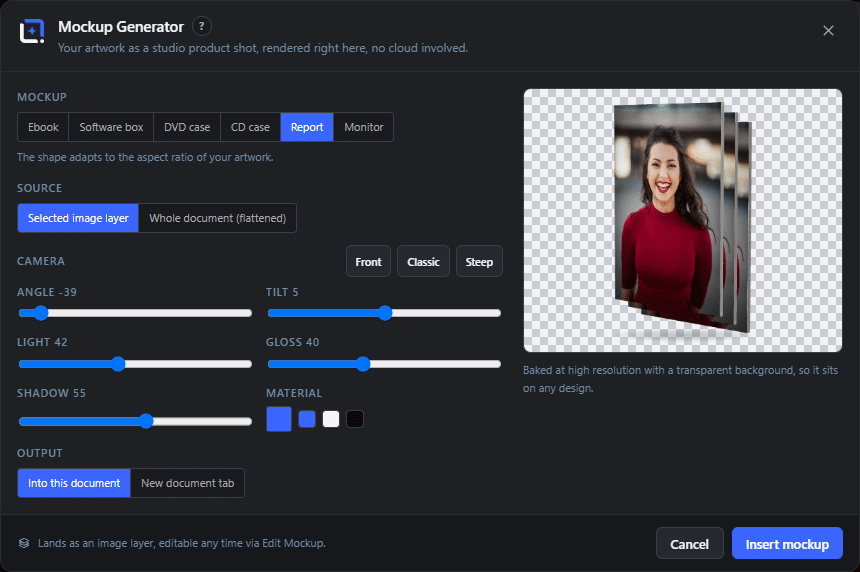
The Mockup Generator dialog in WunderPaint
Design Tools

Put your design onto a real object, without a photo shoot.

Some things need to be shown as objects before anyone believes in them. A digital product especially: an ebook, a course, a template pack. They have no physical form at all, and a picture of a book is the shorthand our brains accept.

The Mockup Generator takes the design you have open and places it onto a rendered object, lit as if it were photographed in a studio. Ebooks, software boxes, screens and a set of other classics, each with the shading and perspective that make artwork look applied rather than pasted.

Two things decide whether a mockup works, and both are worth saying out loud. Match the light: if the scene is lit from the left, your artwork should not carry a shadow falling left. And use them sparingly, because a page where every product is the same rendered box reads as a template gallery rather than a shop.

For heavier work there is a separate 3D Mockup Studio extension with a much larger catalogue and per-surface artwork. This built-in one covers the everyday cases, which is most of them.

Play Video

Where to find it

Tools, then Mockup Generator

What it replaces

Paid mockup template packs and the layered files that go with them

What you get

  • A set of studio-style product mockups
  • Automatic placement of the current design
  • Realistic shading and perspective on the artwork
  • Insertion as a normal layer
  • Works with the rest of the editor afterwards
  • No external service, no account

Requirements

Part of the free plugin.

Frequently asked questions

This one covers the everyday objects quickly and is part of the free plugin. The extension adds a much larger model catalogue, artwork per surface and a spin view, for people who need mockups regularly.
Yes. The objects are rendered, not photographed, so there is no model release or stock license involved.
That is the point. Artwork on a curved or angled surface has to bend with it. If it looks perfectly flat, the eye reads it as a flat picture stuck on a photograph.

Features

Objects that sell digital things

Ebook, software box, monitor and more, the shapes people already read as products.

Features

Studio lighting, done for you

The artwork is shaded and warped onto the object rather than laid flat on top, which is what stops it looking like a sticker.

Features

Uses the design you have open

No exporting, no uploading, no round trip. The current document becomes the artwork.

Features

Lands as an editable layer

Drop it into a bigger composition, mask it, put it on a background, add a shadow of your own.

Experience Mockup Generator in WunderPaint

Put your design onto a real object, without a photo shoot.

Brush & Paint Styles

Paint with six styles that mix pigment instead of blending it, pick from thirty-seven tips shown as real strokes, draw a tip of your own out of shapes, and let the color travel along the stroke.

Collage & Photo Grid

Arrange media library photos as a grid, mosaic, polaroid, filmstrip or contact sheet, tune gaps, corners and frames on a live preview, and insert it all as an editable layer group.

360° Panorama

Describe a place and the tool builds the full sphere around you, or let it rebuild a photo you already have as the whole scene around the camera. What comes out is somewhere visitors can look around, hotspots and all, in an embed that carries its own viewer.

AI Studio

Generate, edit, retouch and clean up images from a prompt or a single click, all in one panel. Many tools run locally with no key; prompt generation uses your own Gemini or OpenAI.

Asset Generator

Gradients, text treatments, shapes and illustrations generated from a prompt, in your brand colors, arriving as editable layers.

Stock Images

Search Pexels, Pixabay and Unsplash without leaving the editor, and insert what you find as a layer rather than a download.