
See it do all of this to a real image, right now, before you install anything.
Getting one promotional image onto your site today usually means a row of browser tabs. The design tool. The stock library. The chart maker. The compressor. The upload screen. Each with its own login, its own idea of your brand colors, its own subscription quietly renewing in the background.
WunderPaint collapses that row into one surface inside WordPress. Same canvas, same brand, same place your content already lives.
Here is how much of the row it covers:
A full layered editor where nothing you do is ever baked in. Move it, restyle it, change your mind years later.
Brighten, sharpen, cut the background away, rescue the shot that was almost right.
Sketch it badly, describe it, pick a style. It comes back finished, as a layer above your sketch.
Your numbers, your brand, drawn as design rather than pasted in as a screenshot.
Point a layer at a title or a price and it writes itself, post after post.
The archive, the catalog, the guest list. Every entry comes out finished.
Search pictures by what is in them, catch duplicates, tidy names, all in place.
Modern formats computed in your browser. No service, no quota, no upload.
Article, images and layout arrive together, as a draft that waits for your verdict.
Finished designs to open and make yours, for every format your site uses.
When the site needs a kind of graphic it never needed before, a studio for it opens on the same canvas.
Logo QR codes, seamless patterns, frames and flourishes that usually eat an afternoon.
Wherever WordPress shows a picture, an Edit button opens the studio over it, and the result lands back exactly where it came from.
Nothing for the team to learn, nothing to migrate.


The client calls at the worst possible moment: the price on the campaign banner is wrong, and the campaign is live.
You could do the old dance in your sleep. Find the source file, hope it is the right version, fix it, export it, download it, upload it, replace it, clear the cache, apologize for the delay.
Now: open the page, click the image, change the number, save. The banner is correct before the call ends. No file left your site, no duplicate landed in your library, and the page kept pointing at the same image the whole time, because the image never went anywhere.
That is the entire trick, and it changes more than speed. When a fix costs less than the phone call about it, things simply get fixed.
That covers every image you already have. The ones you have not made yet are where it gets interesting.
The reason most site graphics look the way they do is the blank page. Nobody has the time, or the design training, to earn every thumbnail from a white rectangle.
So here you never get the white rectangle. You get shelves. Finished designs for posts, stories, product cards, popups and email headers, all built from live layers. Open the nearest one, put your words in it, and walk away with something that looks commissioned.
The headlines come already designed, as real text: change the wording and the design holds. Behind them sit icons, shapes, gradients, photos and patterns in every direction you can think to search.
And your brand is set once. Colors, fonts, logo. From then on everything you open, everything you generate, everything a colleague throws together on a Friday afternoon, comes out looking like yours.
Posts, stories, thumbnails, product cards, popups, email headers. Open the closest one and put your words in.
Title treatments and price tags as live text. Change the words, the design holds.
Icons, shapes, gradients, photos and patterns, all landing as editable layers.
Colors, fonts and logo set once, showing up in everything, including what the AI makes.
There are two honest ways to use this thing.
The first is Easy Mode: the same document with most of the controls put away. Drag, drop, retype, save. It is the mode you switch on before handing the site to a client, an intern, or your own future self in a hurry. Nothing in it can destroy anything, because every step can be walked back.
The second is the deep end. If you live in professional design tools, the full bench is waiting: type you can shape down to the single letter, text that bends along any curve you draw, effects that stay editable long after you applied them. PSD files open with their layers intact and save back out the same way.
It even gives your work a second pair of eyes: it can flag every line of text that has become hard to read against what sits behind it, and it can show you the whole canvas the way a color-blind visitor will see it.
Same document at both depths. You can change your mind in the middle of a picture.
The essentials, on the real document. One switch to go deeper, whenever you are ready. And whichever depth you work at, one rule holds underneath everything.
Nothing you make here is ever flattened, locked away, or lost to an export.
The layered working file travels with the image itself. The banner from last spring still opens as a design: every layer, every word, exactly where you left them. The person who made it can be on holiday, or long gone, and the change is still a small one.
Saving creates versions, and versions roll back. Which quietly changes how you work. When nothing can be ruined, you stop playing it safe and try the bolder version first.
That same safety is why the AI in this studio behaves differently from what you have learned to expect.

Half of the AI here needs no account, no key and no cloud. Cutting a subject out of its background. Making a too-small image large enough to use. Blurring every face in the crowd photo before it goes on the events page. Writing alt text. That work happens inside your own browser, on your own machine, and the image never leaves your site. Some of these helpers use a small model your admin downloads once; from then on it is served from your own server, like any other file on your site.
The other half is generation, and it exists for everyone who cannot draw. Block the idea out in rough shapes, write one sentence about what it should become, pick a style and a mood. The finished graphic comes back as a new layer stacked above your sketch: the original untouched underneath, the result on top. Keep it, rerun it, or modify it to suit your needs.
It runs on your own key, only in the second you click, and the key stays on your server.
Nothing runs until you click, and nothing is ever trained on your work. It is a tool on the bench, and it stays on the bench until you pick it up.
Everything to this point makes one image at a time, with you at the wheel. The next part is why the word Automation is in the headline at the top of this page.
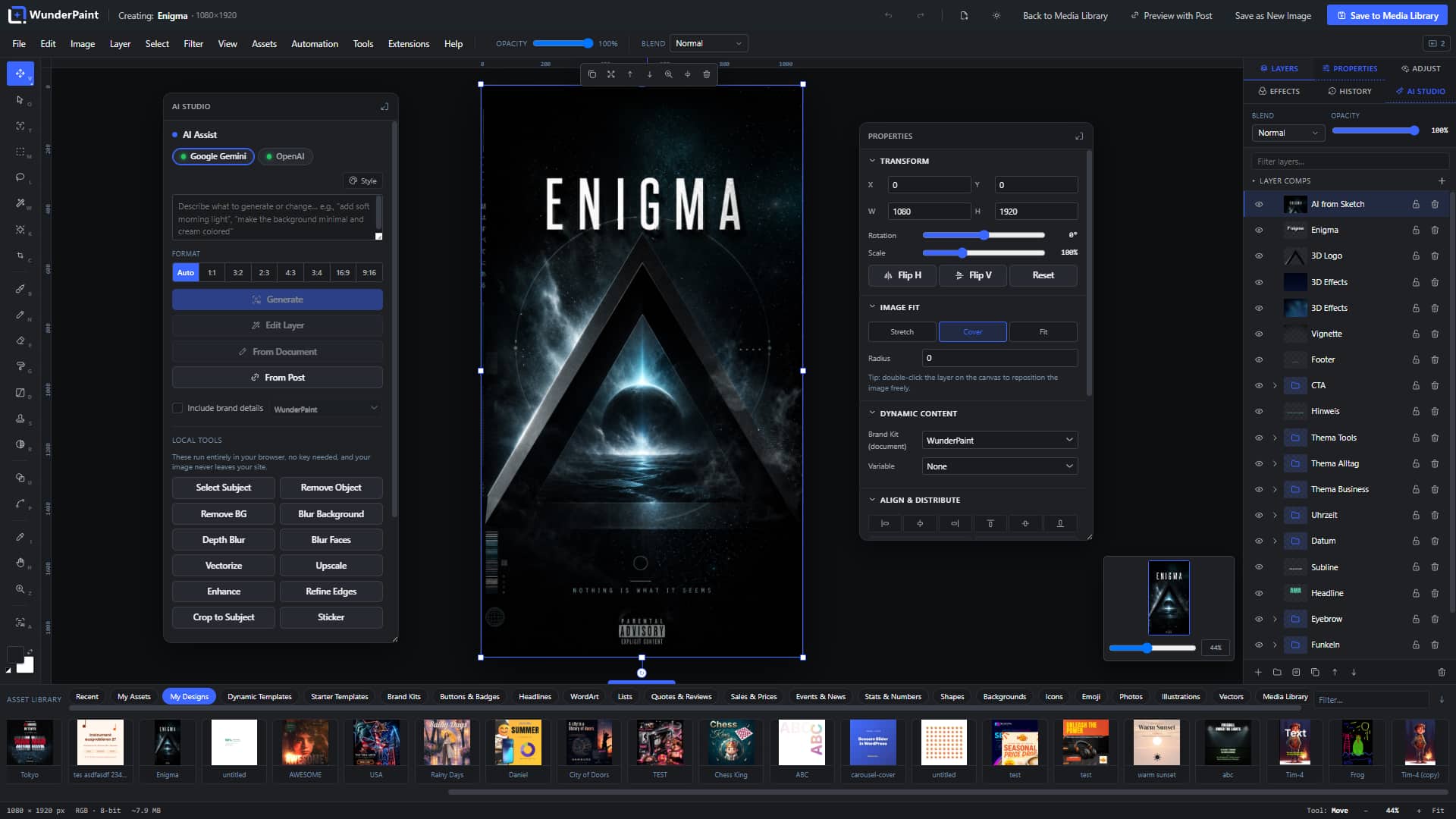
Toolbar
Rulers
Menu Bar
Panels
Context Bar
Canvas
Quick Context Bar
Navigator
Asset Library
AI Studio Panel
Properties Panel
Save Dialog
Dynamic Preview
Tab Switcher
Filename & Size
Build one design. A title, a background, maybe a price, arranged the way you want every post to look.
Then, instead of typing into those layers, you point them at your content. This text layer is the post title. This image layer is the product photo. This one is the price. Preview it against a real post and watch it fill in, the headline resizing itself to fit the space you drew for it.
From that moment, the design is reusable in a way no exported image ever was. Any post, any product: drop it in and it is already right. Tomorrow’s post, next month’s product, same design, correct words, no extra work.
And that one idea covers most of what a site actually keeps needing. Featured images that match every post. The preview graphic that appears when someone shares your link. Offer graphics that pull the price straight from the product. The weekly webinar announcement where only the date and the speaker change. Job listings, property cards, the lunch menu: anything you keep rebuilding with new words in it, you now build once.
You did not make an image. You made the image for every post you will ever write.
A design plugged into your titles, your prices and your customer data had better answer one question before anything else: where does all of this actually run?

Your website.
Your images.
Your data.
The editor runs in your wp-admin. The files live in your media library. The search, the background removal, the face blurring, the compression: your own browser does that work.
We collect nothing. No telemetry, no usage report, no account with us, so there is nothing to opt out of, and the fonts are served from your own domain.
What leaves, leaves because you asked for it. An AI request goes to the provider you chose, with a key you own that is stored on your server and never handed to any browser, including yours. An address lookup goes to OpenStreetMap. A local AI model is fetched once and served from your site ever after. Each of them is named in the plugin readme, with what it receives and when.
Pro is the one piece that reports to anyone: it activates its licence with Freemius, who sells it, and checks now and then that it is still valid. Your images and your designs are no part of that conversation.
Privacy compliance is not something we bolted on. It is what remains when the work happens where the files already are.
And because everything happens at home, this plugin can do something useful for the part of your site nobody enjoys managing.
The landing page needs that one product shot from last year’s photo shoot. You know it exists. It is buried under years of uploads, every one of them named by a camera or a phone.
Now you search for what is in the picture, in plain words, and it surfaces. The shot on the white background. The one with the red jacket. The team photo from the summer. That search runs on a model hosted on your own site, so even your vaguest queries stay home.
The rest of the housekeeping gets the same treatment. Real folders and tags, stored the way WordPress itself stores things, so they belong to your site permanently, whatever plugins come and go. A duplicate finder that shows you the pairs and lets you choose. Alt text for the whole library, written in one pass and held for your review before a word is saved, so search engines and screen readers finally get what they came for. Cryptic camera filenames renamed in one pass. Images compressed to modern formats in your browser, with no service on the other end and no quota counting down.
Plenty of people run WunderPaint for this section alone and never open the canvas. That is a perfectly good life.
For everyone else, the building keeps adding rooms.


Every few months the work changes. The site suddenly needs a kind of graphic it has never needed before, and the usual answer is a new tool, a new account, a new learning curve, another invoice.
Here the answer is a studio. Specialist workrooms open on the same canvas, follow the brand you already set, and hand back ordinary layers you keep editing like everything else. Before you go shopping for another tool, you check the shelf, and the shelf usually has it.
New extensions keep arriving, and every one of them plugs into the editor you already know. The canvas you learn today is the front door to all of them.





Everything above is the free plugin, whole and unlimited. Pro is for volume, and for graphics that keep themselves correct.
Volume looks like this: pick a design, select the posts, press run, and watch the queue turn an archive of bare posts into a wall of finished featured images, each carrying its own title, all unmistakably yours. Map different designs to different categories and the tutorials come out looking like tutorials, the reviews like reviews. Point the same machinery at a WooCommerce catalog or a spreadsheet and it is the same story: one design in, a finished series out.
Need the words as well? Ask for a whole post and judge the draft: article, featured image, social preview and body images, all in your brand, publishing nothing on its own.
And then the part that feels like cheating. Put a design on a page as a dynamic image, and when the post behind it changes, the picture is redrawn with the new words. A price corrected in the shop reaches the graphic that advertises it. A live badge is filled in fresh from the post as the page is built, so an edit shows up without waiting for anything to re-render. A personalized image can greet each campaign visitor with their own name inside the design.
None of it is required. The free studio is complete either way. Pro is simply there for the week the volume wins.
Which leaves the obvious question: why is the rest of it free?
I run my sites on WordPress, like you. And I was tired of renting permission to leave them: one subscription for design, another for compression, another for stock, each one a tab, an invoice and a login away from the place my work actually lives.
So the free plugin is the entire studio, permanently. Every tool, every template with no timer on it and no locked doors inside it. Pro exists because generating images at industrial scale costs real money to build and support, and the people who work at that scale fund the studio for everyone else.
If the free version ever starts to feel like a demo, tell me. I will treat it as a bug.
No. You open something that already looks good and change the words. The editor keeps things aligned, spaced and in your brand colors on its own, and the depth stays out of your way until you go looking for it. People who design for a living will find the whole bench underneath.
Yes. The full editor, the templates, the library tools and the local AI helpers are free and stay free. There is no trial period and no timer running anywhere. Pro and the extension studios are optional, built for volume work and specialist jobs, and they are what funds the free editor rather than what replaces it.
Scale, and graphics that look after themselves. Pro runs one design across whole archives, catalogs and spreadsheets, drafts complete posts together with their images, and puts graphics on your pages that redraw themselves when the content behind them changes. If you make images one at a time, you may honestly never need it.
Nowhere by default. Editing, compression, search and the local AI helpers run on your own server and in your own browser, so your pictures are not uploaded for any of that. Something leaves your site only when you ask for it: a prompt to your own AI provider with your own key, a search in a stock library, a place name for a map poster. Every one of those connections is written up service by service, down to the exact data it sends, in the external services reference. There is no analytics, no tracking and no telemetry anywhere in the plugin.
No. The editor, the templates, the library tools, background removal and upscaling all work without one, and so does the semantic search after a one-time model download that lives on your own server from then on. A key from your own provider account additionally unlocks image generation and prompt-based editing. You paste it once into the settings, it stays on your server, it is never handed to the browser, and nothing runs until you click.
Yes. Gutenberg, Elementor, Bricks, Divi and anything else that uses the WordPress media picker. Every image gets an Edit button that opens the studio over your layout and drops the result back exactly where you were.
Product name, price, discount, stock and rating are variables you can point design layers at, so one design can cover the whole catalog. And a live badge on a product page always shows the current price, because it is filled in fresh from the product each time the page is built.
Yes. PSD files open as layered, editable documents, and your work exports back to PSD. The round trip keeps the layer structure as faithfully as the two formats allow.
No. The editor loads only inside wp-admin, and only when you open it. Your visitors receive ordinary, optimized images and never load a byte of the studio.
That is almost always an image optimizer, not the edit. Saving over a library image keeps the same URL, and plugins that deliver WebP or AVIF (Imagify, ShortPixel, EWWW, Smush and others work this way) serve a converted copy from that URL. Until they convert the image again, that copy is still the one made from the previous version, so the editor shows your change and the public page does not.
Two ways around it: re-optimize that one image in whichever optimizer you use, or choose Save as New Attachment when you edit, which writes a copy with its own URL that no older conversion can point at.
A normal WordPress host and a current desktop browser. No external service is required and there is nothing to configure before you start; the optional local AI helpers fetch their models once, on your request, and store them alongside your own uploads. It is a desktop studio, so you will want a real screen and a mouse. The heavier three-dimensional studios lean on your graphics hardware, and Help, System Status tells you exactly what your machine offers.
Yes. A permissions setting decides who gets the studio at all. And for clients and occasional editors there is Easy Mode: the same documents with the essentials only, where every step can be walked back.
Nothing breaks. Pro and your extensions keep working exactly as they are, and your designs are never touched. An active license is what brings updates, new features and support, so renew when you want those back, and not before.
Your site keeps everything. Images are ordinary files in the media library. Folders and tags are stored as regular WordPress taxonomies, so they survive without the plugin. And your layered projects stay in the uploads folder, small and quiet, in case you ever come back.
The editor ships in English, German, Spanish, French, Portuguese, Italian and Dutch, extensions included.
Yes. The demo is the full studio with every extension switched on, running in your browser with no account. Open an image and put it through everything this page has promised.
Inside the editor first: the handbook lives right in the studio, and the built-in assistant answers questions and walks you through features step by step. Beyond that, the documentation site covers every feature down to the single control.
Open the demo: the full studio with every extension switched on, no account, nothing to install. Or drop the free plugin onto your own site and click Edit on any picture in your library, which is the more convincing version, because it is your image, on your page, on your server.
Either way, do the one thing this whole page has been describing. Change something, save it, and watch it land back exactly where it lives.
After that, the pitch makes itself.